

Developer quickstart
Make your first API request, then turn an audio recording into text. The examples use a personal API key and a terminal with curl.
Create an API key
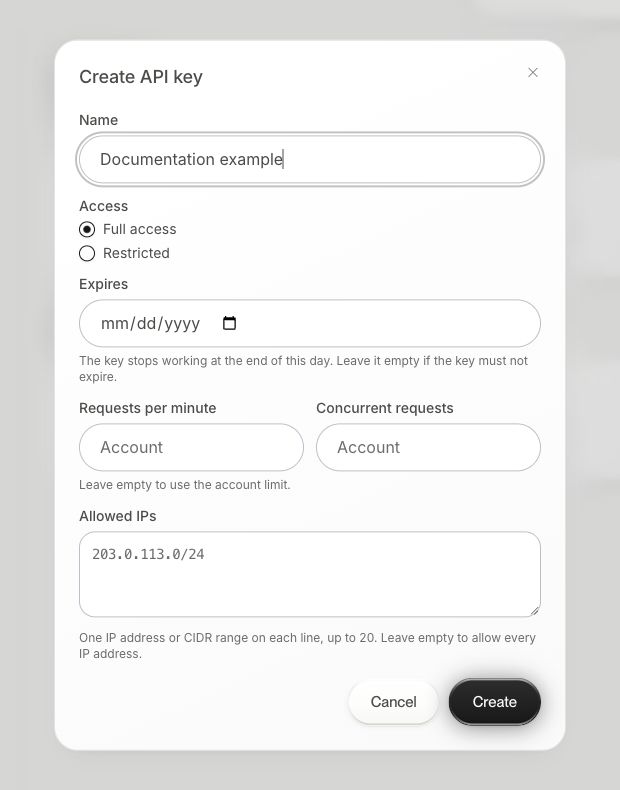
Open the API dashboard and create a key. Review the dashboard's API billing and usage information. If you restrict the key's scopes, include dictation and transcription for the examples below.
Set an environment variable in your terminal. Replace the placeholder with your key. Keep the key on your server when you build an app.
export AQUA_API_KEY="your-api-key"
Check authentication
curl --fail-with-body https://api.aquavoice.com/v1/me \
  -H "Authorization: Bearer $AQUA_API_KEY"
The response identifies the current user and credential. A 401 response means you need to check the key and its expiry. Organization keys have additional user-selection rules. See Authentication in the API reference.
Turn speech into finished text
Save a short recording as audio.wav in your current directory. This request applies your account's dictionary, replacements, and instructions to the dictation.
curl --fail-with-body https://api.aquavoice.com/v1/dictations \
  -H "Authorization: Bearer $AQUA_API_KEY" \
  -F "audio=@audio.wav" \
  -F "operation=dictate" \
  -F "language=en"
Read the text field in the JSON response for the finished text. The response also includes session_id, language, and duration_seconds. Privacy and retention settings still apply.
For spoken edits, send operation=edit and a selected_text field with the text to change. Your audio should contain the edit instruction. The returned text is the replacement. Inspect edit_unclear and edit_deleted before applying it. See the dictation endpoint.
Transcribe an audio file with Avalon
Save your recording as audio.mp3 and call the transcription endpoint. This example returns a transcript in the text field.
curl --fail-with-body https://api.aquavoice.com/v1/audio/transcriptions \
  -H "Authorization: Bearer $AQUA_API_KEY" \
  -F "file=@audio.mp3" \
  -F "model=avalon-v1.5" \
  -F "response_format=json"
Use response_format=srt or vtt for subtitles. For speaker labels, use diarize=true with response_format=diarized_json. For longer processing, use the asynchronous transcription endpoint.
Handle errors and retries
- Save the response's
X-Request-Idwhen you need support. - A
403can indicate that the key lacks a required scope. Check the response body and dashboard settings. - For
429responses, followRetry-After. - For a dictation you may retry, send an
Idempotency-Keythat is unique to that recording and request. Reuse that key with the same request on a retry. - A synchronous transcription can return
504 request_timeoutwitherror.job_idwhile processing continues. Poll that job instead of starting a duplicate.
The API reference contains request limits, response schemas, billing, and data handling. Use the CLI reference to work from the terminal without writing an integration, or MCP documentation to connect an AI app.