Aqua Voice for iOS
By Finnian Brown
5 min read
Aqua Voice for iOS is live. It lets you write and edit text using only your voice anywhere.
The key features are:
Ultra Low Latency
All New Model (Avalon 1.5)
Voice Edit Mode
Aqua for iOS uses an all new model backend that's more accurate, contextually aware, and faster. It's also more noise robust, which is perfect for using your phone on the subway or other high-noise environments.
Ultra Low Latency
We took our time getting the details right and tuning each piece of the system to minimize latency, while preserving the output quality users love. We've used 53 separate test devices internally to tune the audio pipeline, and tested it with thousands more during the beta (thank you!).
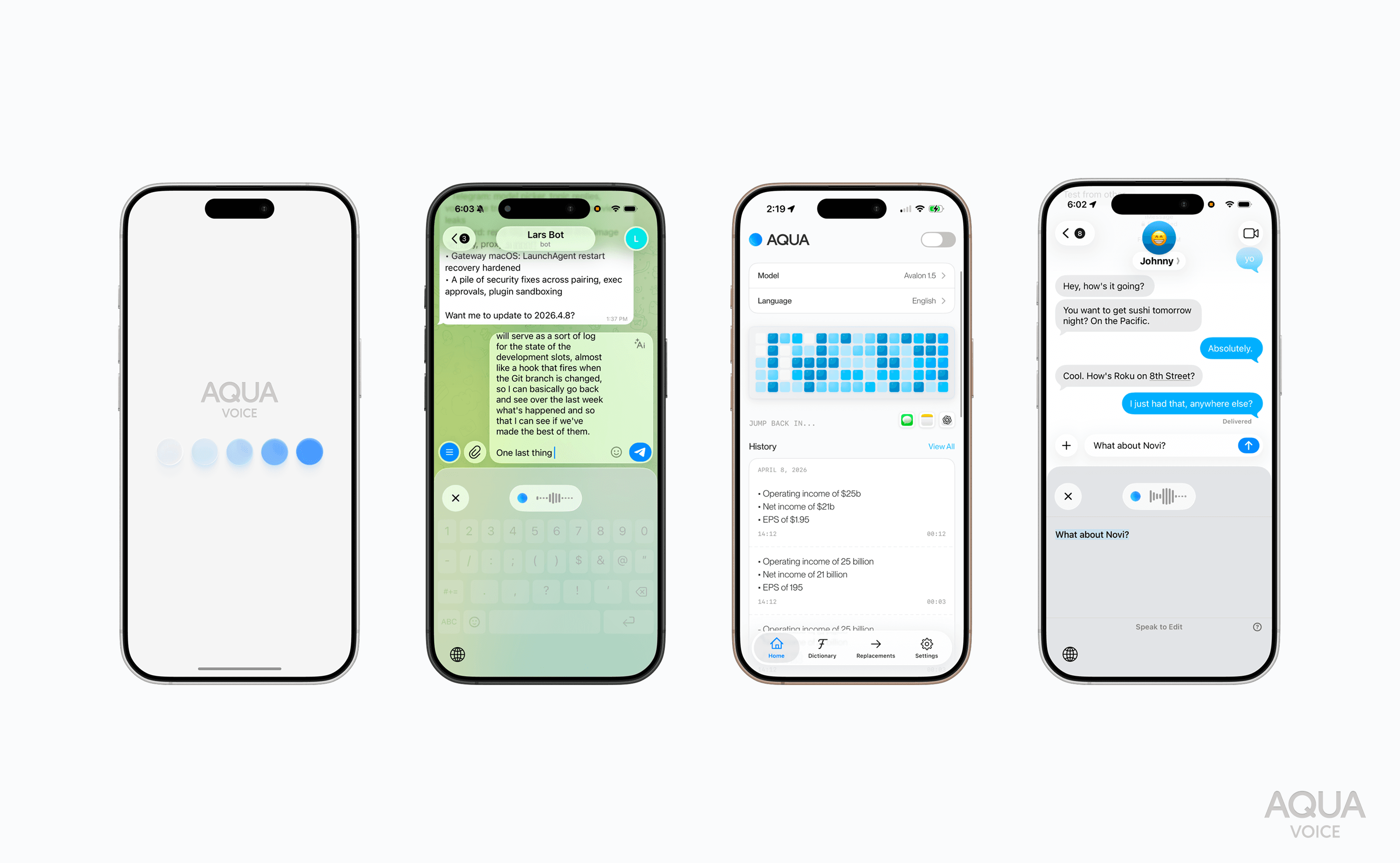
We hope the polish and focus on quality is as obvious to you when you use it as it was time consuming for us in the development process.
Voice Edits
iOS has been highly requested, but it took us a while to figure out how to make it amazing.
Here's the problem: Editing sucks on the phone. It's not very easy to select text. It's not very easy to move the cursor, and it's not very easy to type.
But… to give you text you’ll actually want using only your voice, editing is often needed. A long brain dump is fine for a bot, but for a Slack message or email you need to be able to iteratively edit and refine a piece of text until they are clear and contain no excess.
Here's our solution:
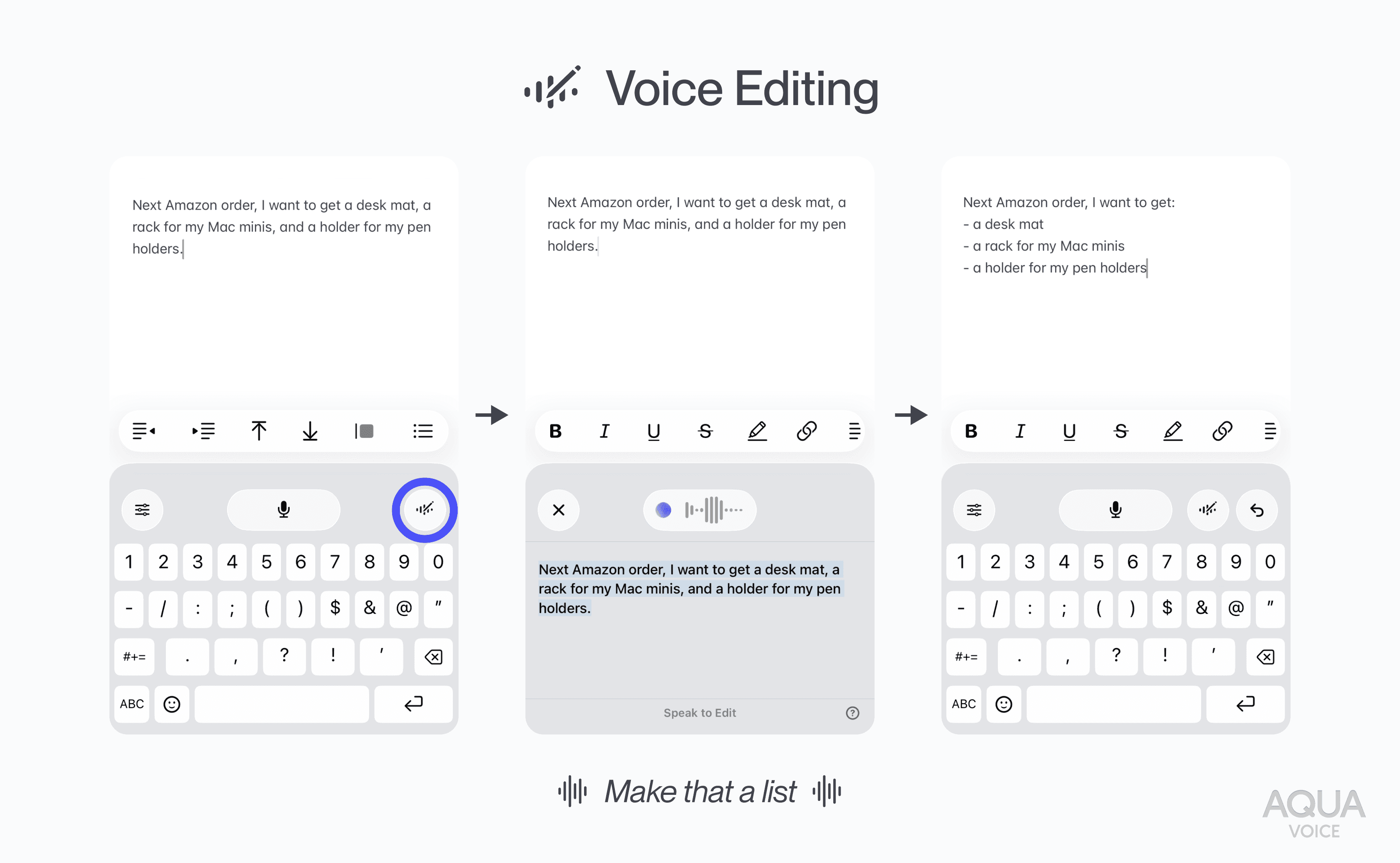
Edit mode allows you to edit your last transcript or current selection with your voice. Here are some examples:
“Remove filler words, this is a slack message”
“Translate this to Japanese"
“Make this title case” / “make this lowercase”
“Use British Spelling”
“Spell Toni T-O-N-I”
“Format the numbers like $10m”
“Break into more paragraphs”
“Remove “But whatever””
“Make that one sentence”
You can use edit mode to fix mistakes, tweak formatting, or iteratively refine your own thoughts to the perfect minimal version. If the edit isn't quite right, you can run the step again to nudge the system to do exactly what you were expecting. You can always tap undo if something goes wrong.
Your Personal Voice Workstation
You won’t believe how much real work you can get done with Aqua on your phone.
This past Sunday, I walked around Golden Gate Park and wrote more than 5,000 words about a book I have been reading.
This wasn't a brain dump or a ramble. Well, it was on the audio side, but thanks to edit mode, I was compacting my thoughts every few sentences to keep the density high. I was making lists. I was formatting complex information. It allowed me to iteratively refine my thoughts into something I'd actually want to read later.
But my real “It can do that?” moment came later that evening. I was using Jump Desktop on my iPhone to command my openclaw running on my Mac Mini. I needed to enter a terminal command to fix something, and I did it with my voice. The original was close, but slightly misformatted. I hit the edit button, described the fix and the text was changed correctly.
Think about that chain of technology: From the Aqua Keyboard for iOS, through Jump Desktop into the macOS terminal, the edit adjusted the text and I could execute my command without ever having to touch the keyboard. After that I knew: this is the way we should be doing input.
Customization
If you've already set up Aqua on desktop, your profile settings, custom dictionary, custom instructions, and replacements will transfer over automatically. If you add any of that to the iPhone app, they'll sync to the desktop.
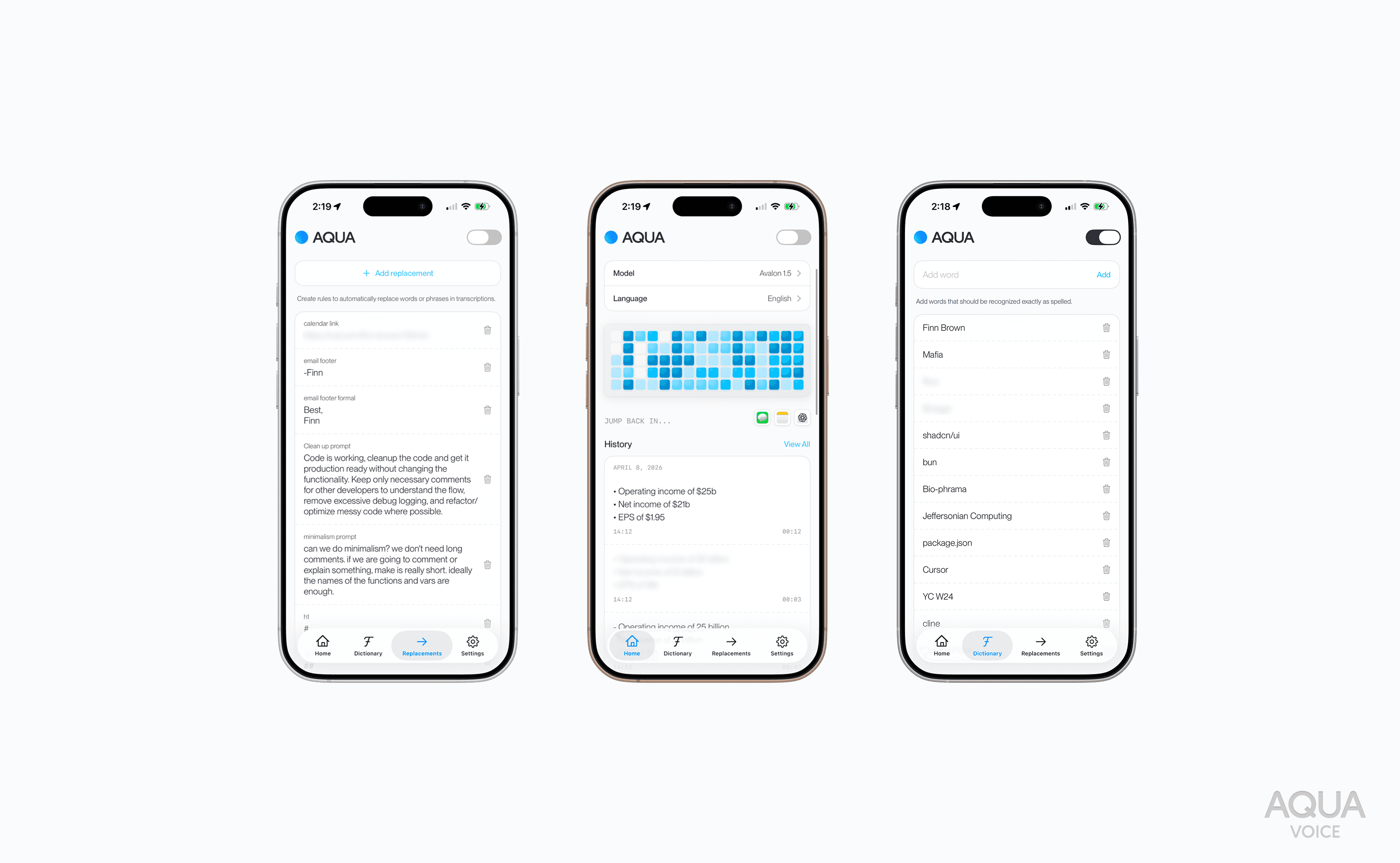
Using Aqua on iOS is truly an experience, and I'd love to share it with you.
Avalon 1.5
Our latest model, Avalon 1.5, is a significant leap over Avalon v1, it delivers state-of-the-art voice input performance and adds new multilingual support!
It scores a 5.55 WER average on the industry-standard OpenASR leaderboard, down from 6.24 for Avalon 1.
But there's more to quality than just word error rate. In blind tests, Avalon 1.5 wins 76% head to head vs. ElevenLabs Scribe V2, a powerful cloud model. It's also more than twice as fast. This comes from training specifically for voice input use cases. By focusing on voice input, the model better recognizes speaker intent and shapes text for its destination, all while filtering out background noise and nailing technical and industry-specific terminology.
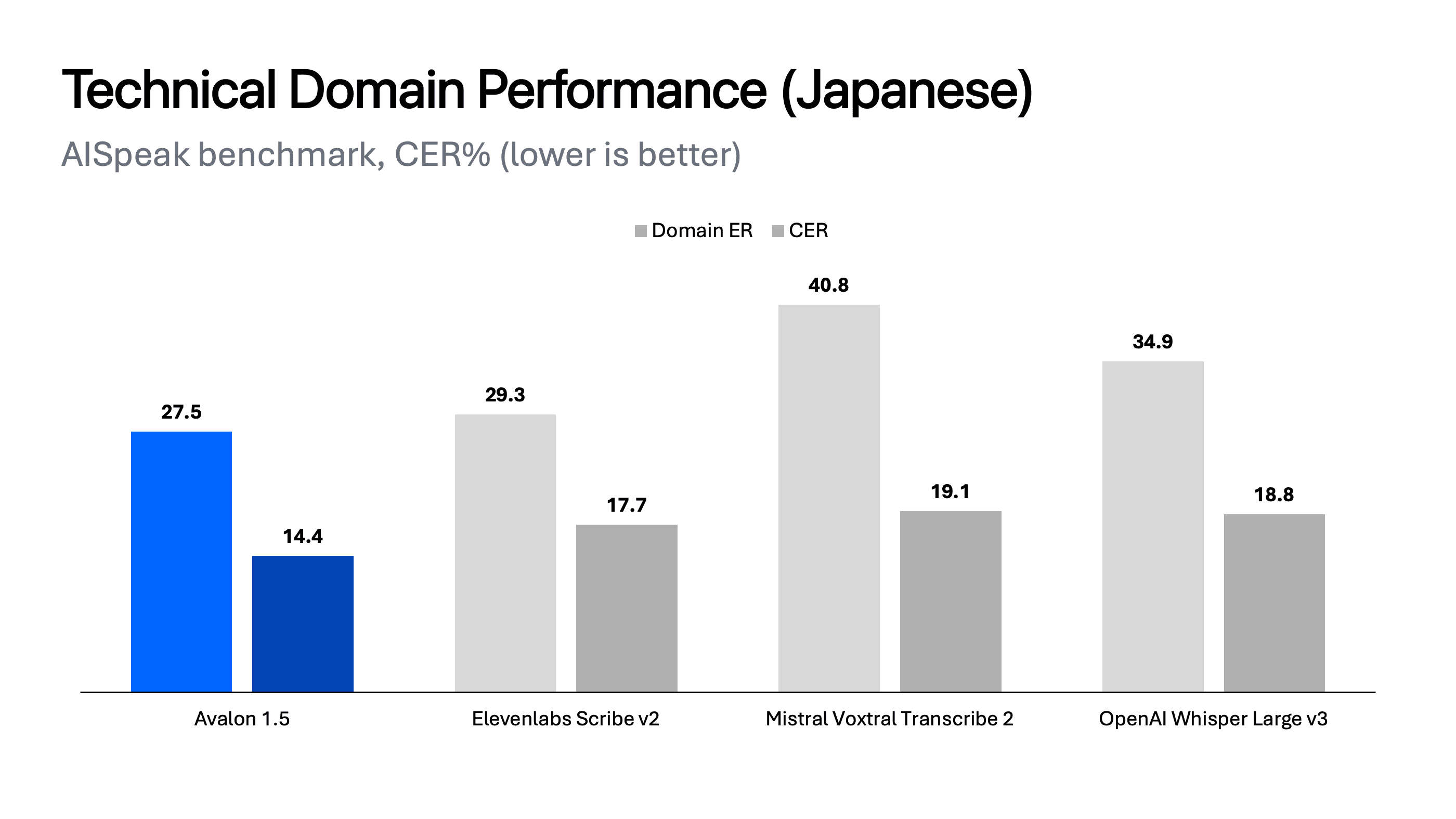
To measure this performance on special terms and common dictation tasks, we created a dataset of typical interactions with AI agents called “AISpeak”. This is where Avalon 1.5 really shines. It gets more of your AI vocabulary right out of the box, without dictionary setup!
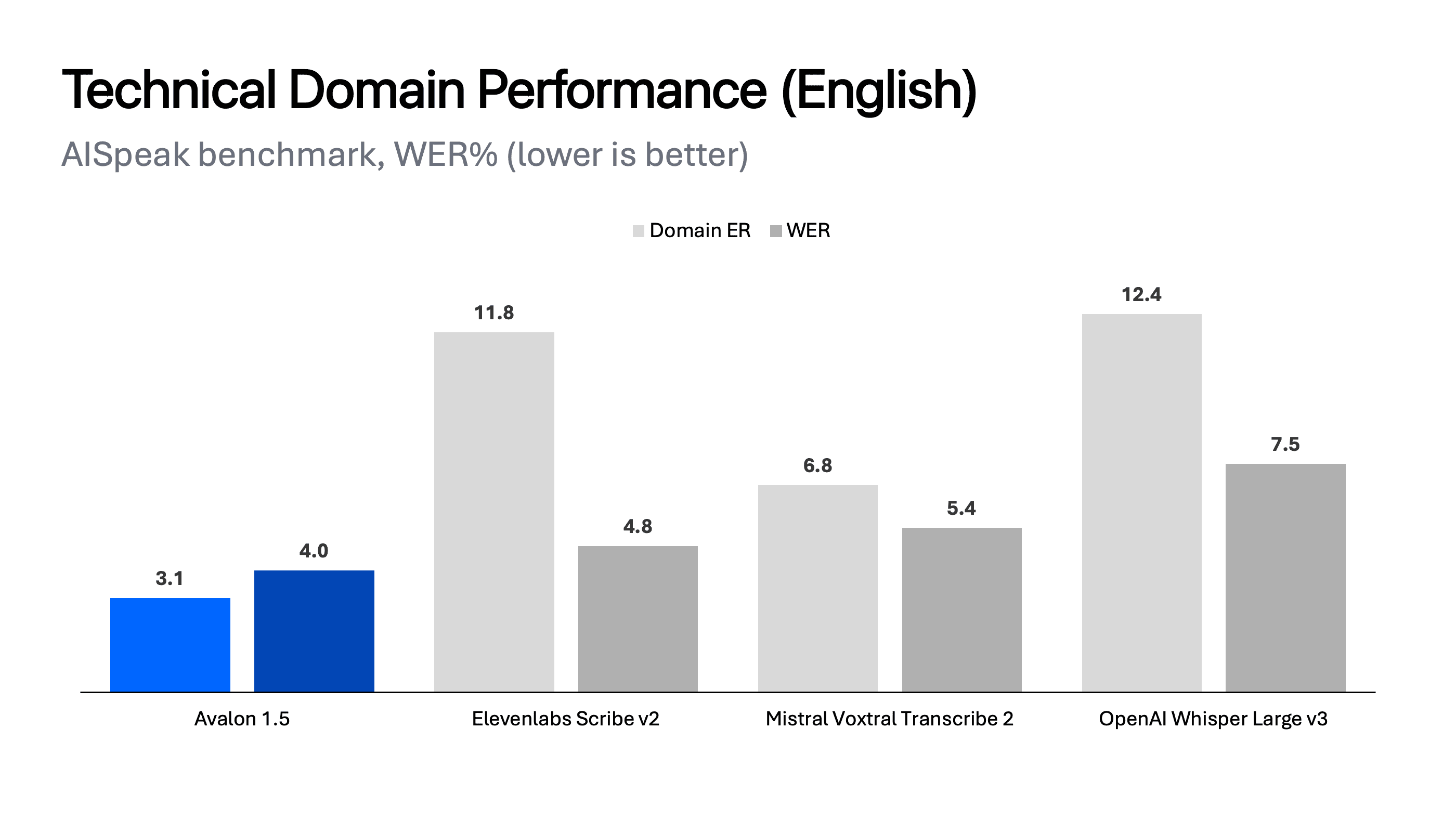
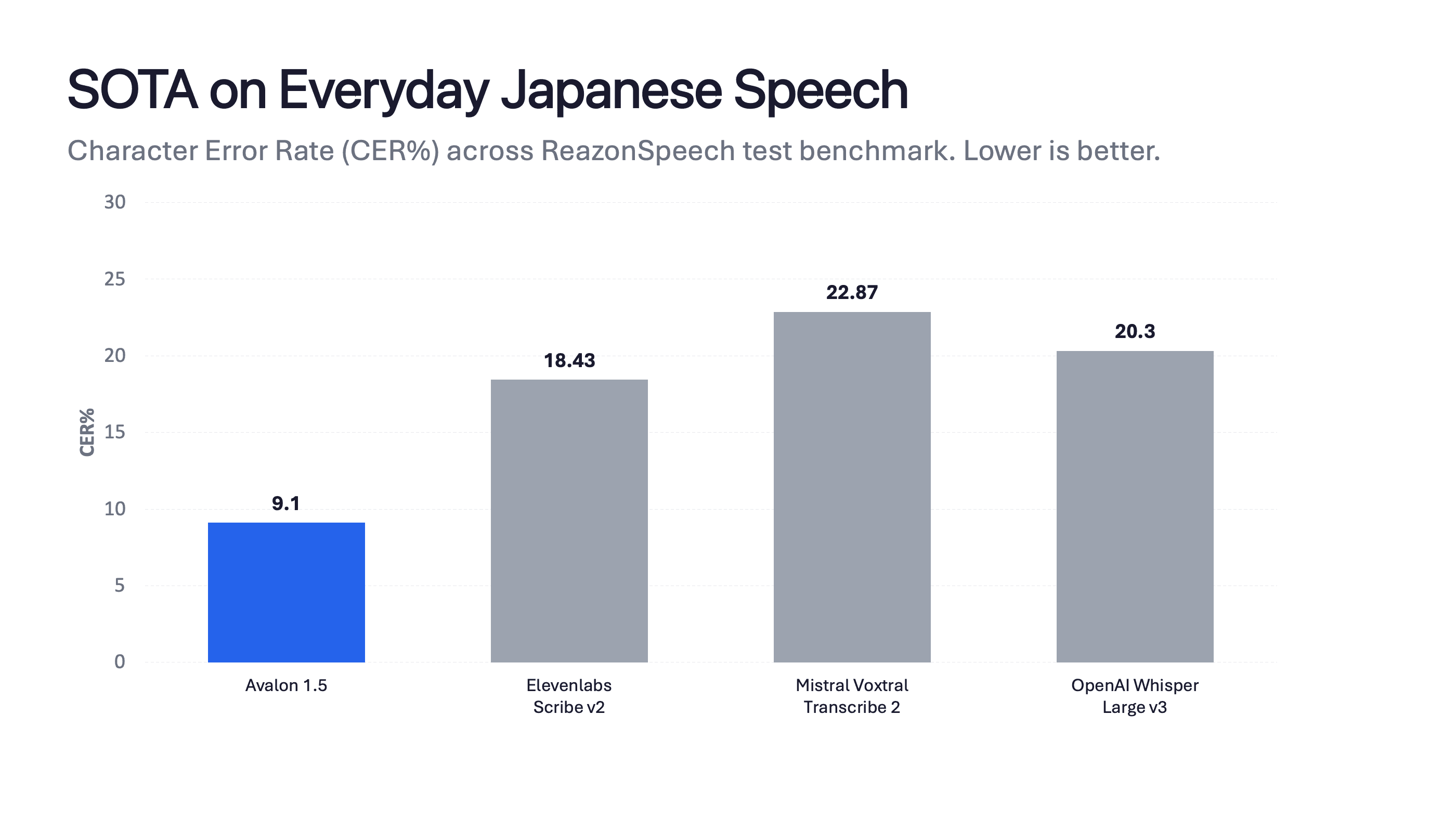
Avalon 1.5 is also our first natively multilingual model, which shows state-of-the-art results across several languages. Of particular note is the jump in accuracy on both large standard benchmarks of everyday speech like Reazonspeech, and on agentic dictation, as shown in our AISpeak Japanese benchmark:
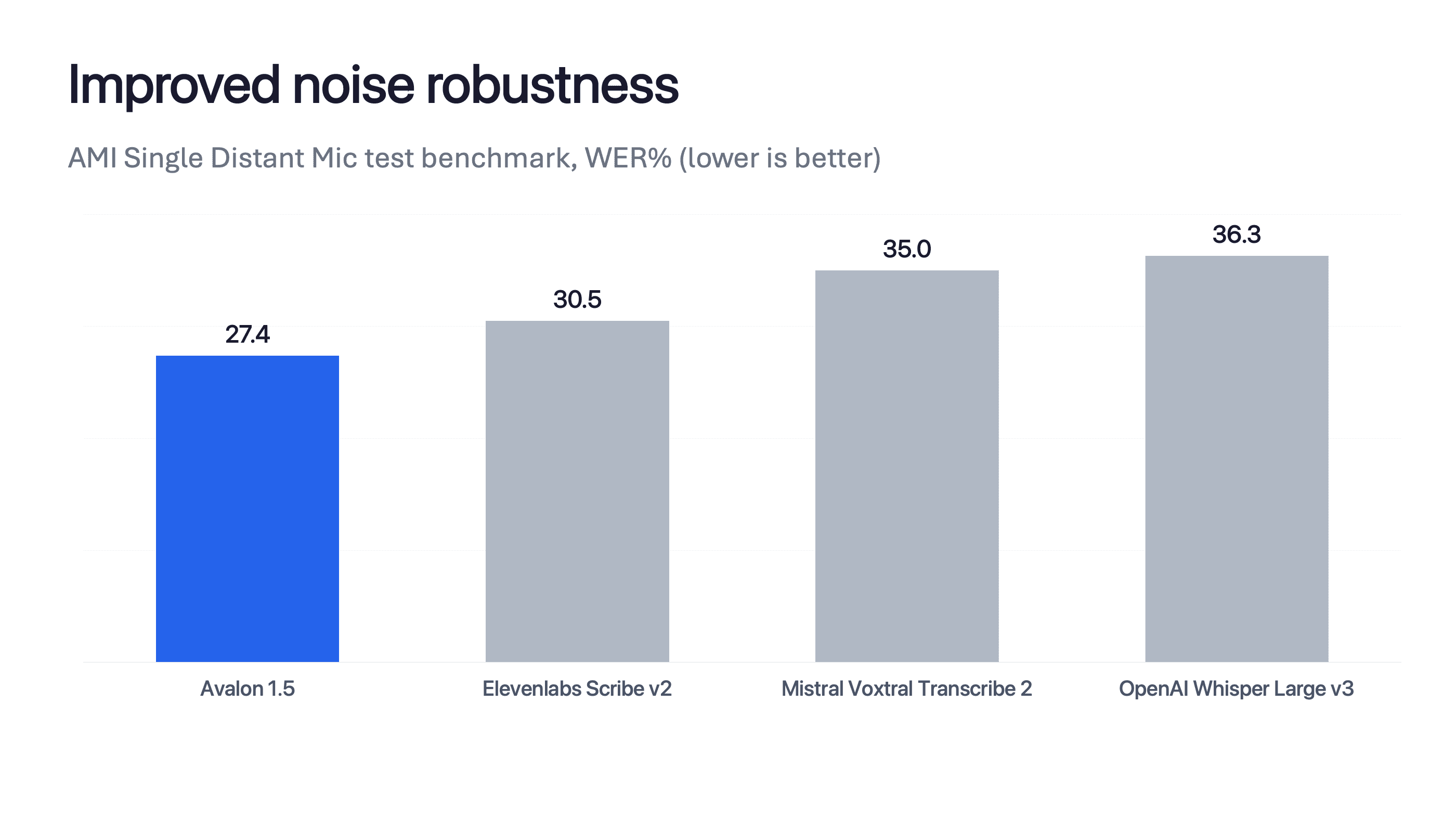
By training on real voice input cases, we didn’t just improve Avalon 1.5’s handling of everyday speech; we also improved its resilience on everyday microphones and environments. The AMI Distant-Mic dataset is notoriously difficult: it features distant microphones, heavy crosstalk, and noise. It’s like any modern office, and Avalon 1.5 achieves state-of-the-art performance here too.
Aqua + OpenClaw
… let me back up for a second. I'm a lover of technology and great products. There are four products that I remember using for the first time and going, "Yes, this is the future."
iPod Nano (2005)
iPhone (2008)
Tesla Model Y (2021)
ChatGPT (2022)
Each was great in its own right, but more than that, each shot an arrow into the future and showed you the shape of the next five years. You could feel that while using them.
OpenClaw is that level of good.
But using OpenClaw with the telegram channel, all I could think, over and over, was: “Why am I typing this all out?”
There was even a time or two when I reached for the built-in voice input system to talk to my bot. As you might expect, this went poorly. The mistakes were so bad I just had to throw it out. The next day, we started coding the iOS app. What you can download today is a result of hundreds of hours of development and testing.
The combination of excellent voice input and an agent with full read and write access to your life is a truly powerful technological experience.
Aqua + OpenClaw = Dream.
Note: This was written in Google Docs using Aqua for iPhone.