Introducing Send It
By Finnian Brown
3 min read

Updated October 12, 2026 to reflect the current Send Command settings.
Dictation gets you to the end of the sentence. Then it hands you back to the keyboard.
That last step is small enough to feel unfair. You said the whole thing out loud, and then your hands still had to come back to the keyboard.
Send It closes that gap. Finish your message with "send it," and Aqua strips the command out of your text, inserts the message, and uses your Send Command setting to send it.
How it works
Send It runs in Realtime Mode, where your words appear live in the Aqua toolbar as you speak. The text lands in your app when you finish.
By default, Realtime Mode turns on when you go hands-free. There is no second hotkey to learn: it uses the same Aqua key as dictation and Edit Mode.
- Start a hands-free session: double-press your Aqua key (Fn on Mac, right Alt on Windows), or hold it and tap Space as you start.
- Say your message, ending with "send it."
The command itself ends the session: Aqua stops listening, inserts the message, and applies your Send Command setting. You can also choose Realtime always under Activation in Settings to use it while holding your Aqua key. Send It is not available in Instant Mode or Edit Mode.
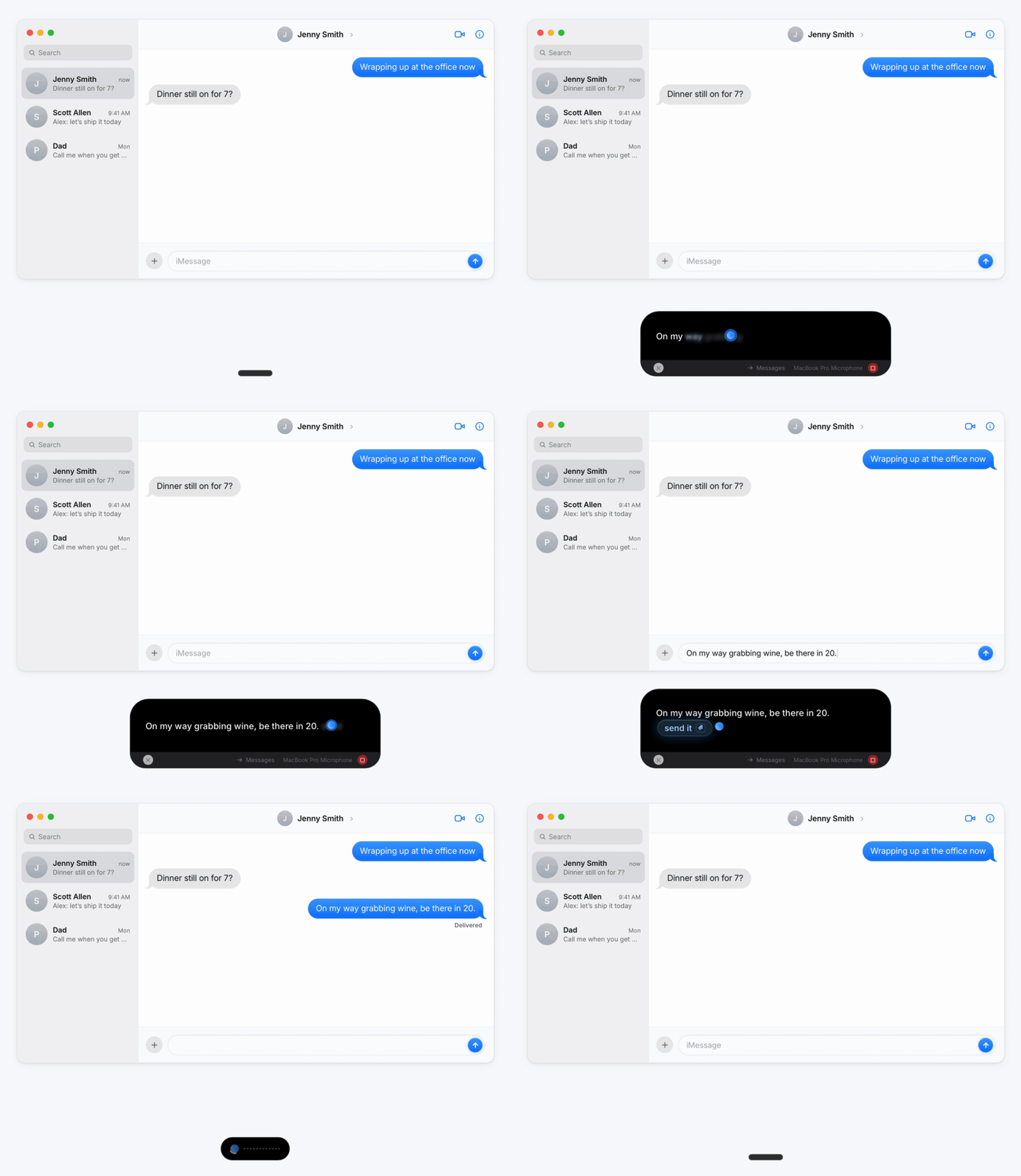
Say "Tell the team that standup is moving to ten, send it," and what lands is Tell the team that standup is moving to ten, already sent. The command words do not make it into the message. They were an instruction, so Aqua treats them as one.
Knowing when you mean it
There is an obvious worry about a command built from two common words: what happens when you just want to say them?
Aqua reads the whole thing you said and works out what you meant, rather than matching a keyword.
You say | What happens |
|---|---|
| "Running late, be there soon, send it" | Sent |
| "Tell them I'll send it tomorrow" | Stays as text |
The rule is that the command has to be the last thing you say. Keep talking afterwards, as in "send it tomorrow," and the words go back to being ordinary dictation.
You do not have to memorize an exact phrase either. "Send it," "send," and "send message" all work, and so do polite forms like "please send this message." Close variants usually land too.
Say it in your language
Send It is not English-only. Dictate in one of these and the natural command works:
Language | You say |
|---|---|
Japanese | 送って · 送信してください |
Spanish | envíalo · envía el mensaje |
French | envoie-le · envoie le message |
German | schick es ab · abschicken |
Russian | отправь · отправь сообщение |
English "send it" also works across Realtime Mode's supported languages, so the command you already know keeps working when you switch languages. Auto-Detect and Yiddish use Instant Mode, where Send It is not available.
Where it works
Send It works on macOS and Windows.
Aqua inserts text at the cursor across your apps. Send It can submit chat messages, emails, and prompts. The key it presses depends on your Send Command setting and, with Auto selected, the app and field you're using.
Choose how it finishes
Open Settings → Send Command to choose what happens after Aqua inserts your words. Auto is the default for new setups; existing installations can keep a previous selection.
With Auto selected:
Where you're dictating | What Aqua does |
|---|---|
Slack messages | Presses Enter |
Email bodies in Gmail or Outlook | Presses ⌘+Enter on Mac or Ctrl+Enter on Windows |
Document text in Notes or Word | Inserts your words without pressing a send key |
Auto checks the app or website and the focused field. In an unrecognized app, it falls back to Enter. You can override Auto with Enter, ⌘+Enter (Mac), Ctrl+Enter, or Paste Only. These choices apply across apps. With Paste Only, "send it" still ends the session and inserts your text, but leaves sending to you.
The last two seconds
Every place dictation makes you stop talking and start operating a computer is a place where the flow breaks. Send It removes the last one in the sequence. You think it, you say it, it goes.
Download Aqua or update to the latest version from the app.