We Tested 20 Tools for Dyslexics: These 9 Are Worth the Hype
By Finnian Brown
14 min read
If you’re dyslexic, your brain works differently. Some call it a learning disability. We call it a superpower.
Right now, the market is packed to the brim with assistive technology options that are supposed to make daily tasks easier for you. But unfortunately, most don't really get neurodiverse thinkers. These tools can actually end up slowing you down and making things harder than they need to be.
So, we set out on a mission to find the best assistive technology tools for dyslexics. The ones that can help you think, create, and communicate in your own rhythm.
To do this, we tested 20 tools, from organization aids to reading comprehension tools and speech to text software. We looked to see what truly helped. Not just in terms of accuracy or accessibility, but in how each one felt to use. Did it make things smoother? Did it get out of the way? Did it respect how a dyslexic brain moves? The tools that did stayed on our list. The rest didn’t.
If you’ve ever felt like traditional assistive technology wasn’t built for the way you think and create, this guide is for you.
Top 9 tools for dyslexia
If you’re short on time, here’s the quick list.
Tool | What it does |
|---|---|
Aqua Voice | Write everything from emails to AI prompts just by talking. |
Grammarly | Polish your writing so it’s clear, confident, and easy to read. |
Keeble | Type more easily with a dyslexia-friendly keyboard. |
Speechify | Listen to anything, from books to PDFs, read aloud in natural voices. |
Learning Ally | Access thousands of human-narrated audiobooks made for dyslexic learners. |
Microsoft Immersive Reader | Turn on-screen text into a calmer and easier reading experience. |
Evernote | Capture and organize your ideas, notes, and to-dos in one searchable space. |
MindMeister | Map out your ideas visually to see connections and the bigger picture. |
Leantime | Plan and manage projects in a visual, stress-free way. |
3 best writing tools for dyslexics
You have all the ideas in your head. But somewhere between thinking them and getting them onto the page, things become a little tangled. And it's extremely frustrating, because the ideas aren't the problem. The process is. We get it.
Here are our favorite assistive tools that take the pressure off when you’re trying to produce written content:
1. Aqua Voice
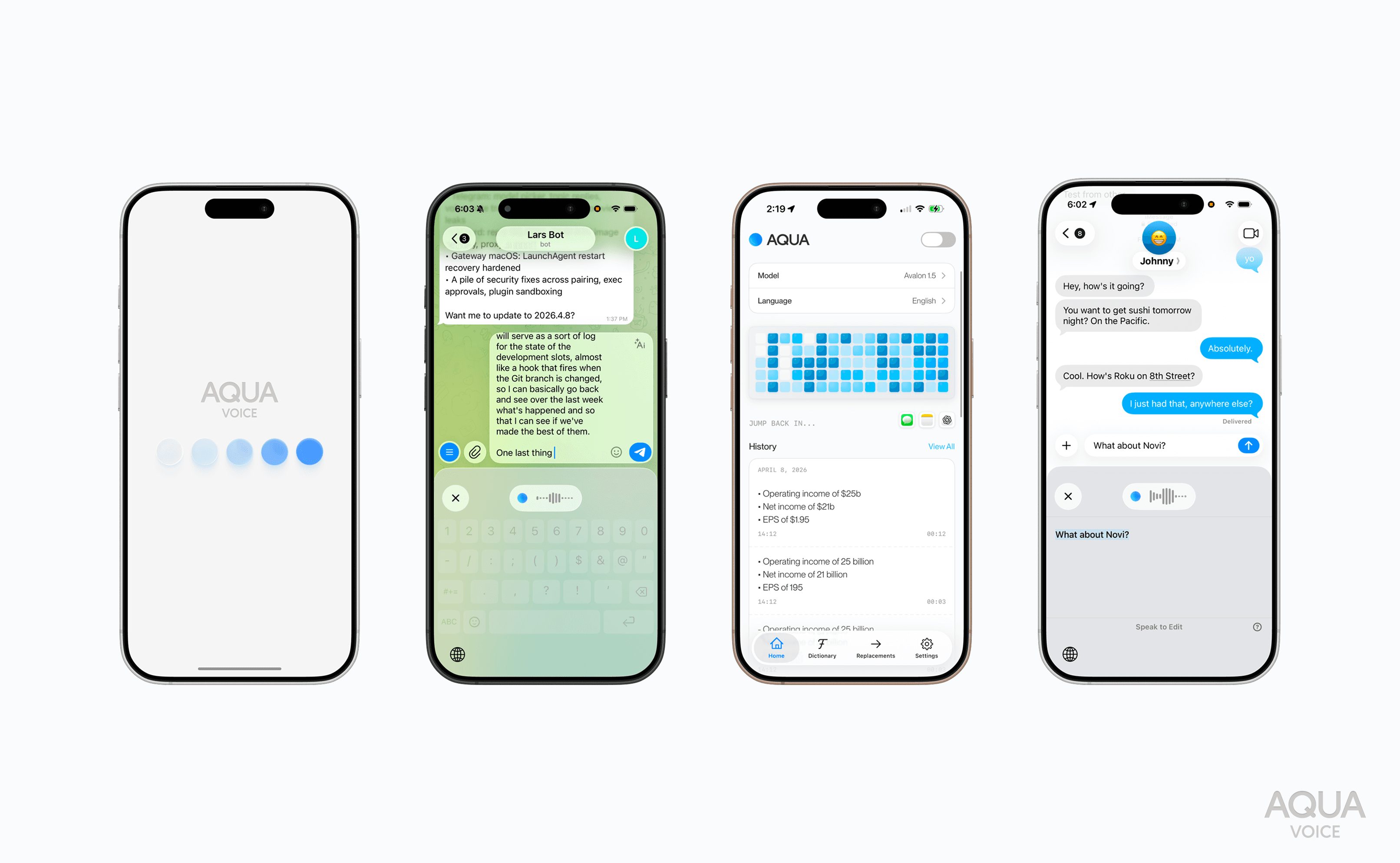
Aqua is fast, accurate dictation software that lets you write with your voice. You can use it for emails, Slack messages, AI prompts, reports, and even code! Just press one key, start talking, and watch clean, natural text appear.
Aqua was built by a dyslexic founder who’s been using speech-to-text since middle school. So, he's no stranger to how frustrating the majority of speech to text software can be: clunky, slow, and totally detached from how people really work.
Aqua was designed to do the opposite: be invisible. It slots right into any app you already use, responds in an instant, and respects your flow. You can capture ideas before they vanish, and without stressing about spelling or structure. You just talk. Aqua handles the rest.
Cost: Free version available. Paid plans start at $8 per month.
What we loved most about Aqua Voice
State-of-the-art transcription accuracy
Your thoughts set the pace... and it keeps up
Works with all your apps (effortlessly)
Built by people who understand the challenges of dyslexia
Best for: Fast-thinking professionals, coders, or creators who want to write as quickly as they think.
"I do a lot of writing and text-based communication every day for work. Before Aqua, that meant that I was constantly hammering away on my keyboard all day. After beginning to use Aqua, though, I can literally sit back in my chair and just dictate everything I need to. It also means that I can typically get longer thoughts out faster and easier by just talking. Even if that includes technical terms or code blocks." - User review // Product Hunt
Download Aqua and try it free.
2. Grammarly
Grammarly is an AI-powered writing assistant. It runs quietly in the background, checking your spelling, grammar, punctuation, and tone as you write. It works pretty much anywhere you write, except in a handful of older or less common applications. We were impressed by how you can adjust it to match how you like to sound. For instance, friendly, formal or somewhere in between. You can also set goals for clarity, intent, and delivery.
Ultimately, Grammarly is a bit like having a second set of eyes that never get tired. It catches slight slips like a missed letter or a word that isn't quite right without you having to stop and double-check every line. You can keep your focus sharp and your thoughts flowing while Grammarly takes care of the polish.
Cost: Free version available. Paid plans start at $12 per month.
What we loved most about Grammarly
Real-time feedback that’s helpful but not distracting
You can accept or ignore with one click
The software is clean and very easy to use
Best for: Writers, students, and professionals who want cleaner, more confident writing minus having to overthink every word.
"I like how Grammarly instantly catches grammar, spelling, and punctuation mistakes. It also gives smart suggestions to improve tone, clarity, and word choice, which makes my writing sound more polished and professional." - User review // G2
3. Keeble
Keeble is a fully customizable iOS keyboard that focuses on optical character recognition. From the moment you install it, you get to completely customize it to look, feel, and work exactly how you need it to. You can change almost everything. For example, font, color, key size, and layout. It even has a “speak as you type" feature that lets you hear every word as it forms.
It’s simple, personal, and does well at making typing feel less like a hurdle and more like an extension of how your mind works. A downside is that it's only available on Apple devices. But it's one of the few assistive technology tools we tested that genuinely focuses on helping dyslexic users. So, that earns it a spot on our list.
Cost: $39.99
What we loved most about Keeble
Made especially for people with dyslexia
Learns from what you write and predicts words as you type
Dyslexia friendly fonts
Best for: iPhone and iPad users who want a calm and supportive typing experience that adjusts to them (not the other way around).
"Great to see a keyboard that can be personalised for users with motor challenges. The ability to customise the dwell functions and the repeat keys options will be an invaluable feature in so many scenarios." - User review // App Store
3 best reading and comprehension tools for dyslexics
As a dyslexic, reading can sometimes feel like hard work. We've been there. Enough to know that the problem isn't in understanding what you read, but in accessing what you read.
Here are our favorite assistive reading tools that reduce visual stress by letting the words meet you halfway:
1. Speechify
Speechify is text-to-speech software that reads written text out loud in natural-sounding voices. It can read everything from web pages to PDFs, Google Docs, books, and even printed text you scan with your phone. The co-founder, Cliff Weitzman, built this tool because he’s dyslexic and knows what reading struggle feels like. His story alone is worth a read.
Highly customizable, it lets you slow it down or speed it up, and choose from hundreds of different voices and accents. If you want to, you can also follow along visually as it highlights each word as it’s read aloud. This can make easy work of tracking sentences and connecting sound with text. Speechify syncs across devices too. So, you can start listening on your laptop and then finish on your phone.
Cost: Free version available. Paid plans are $29 per month or $138.96 per year.
What we loved most about Speechify
The AI Summaries feature is perfect when you just need the gist
It can auto-skip clutter like headers, footers, and other distractions
The story behind the software
Best for: People who read a lot for work, study, or pleasure and want better reading comprehension without the fatigue.
"I use Speechify to help me ingest long-form text documents. I read a lot for my work (and for pleasure) and Speechify alleviates the stress on my eyes and gives me a new way to take in info. I also love the narrator voice selections! Having Snoop Dog read you a long, boring document is a game changer!" - User review // Software Advice
2. Learning Ally
Learning Ally is an audiobook-based reading program. It's a digital library made for dyslexic students and others with learning differences. The platform gives them access to more than 80,000 human-narrated audiobooks. This includes textbooks, literature, and popular titles used in schools that students can listen to and follow along with highlighted text.
For parents and educators, Learning Ally offers an amazing way to help students keep up without the stress of decoding every word. Beyond better understanding, it can build students' confidence and engagement, and allow them to really connect with what they're learning. It’s used in over 24,000 schools across the US and supports dyslexic children all the way through to college-aged readers.
Cost: We recommend contacting Learning Ally directly because pricing varies depending on whether it’s for an individual or a school. Rebates are also available sometimes.
What we loved most about Learning Ally
Built specifically to support students with dyslexia
Backed by research that proves improvement
Run as a nonprofit that focuses wholly on literacy access for students who need it most
Best for: Parents, teachers, and schools helping dyslexic learners overcome challenges with reading and comprehension.
"The setup is pretty easy, and there's a rich collection of resources and videos for help. Live chat is also available. Students can tweak the reading experience to their needs." - User review, common sense education
3. Microsoft Immersive Reader
Microsoft Immersive Reader is a built-in reading tool that makes digital text easier to see, hear, and understand. It’s available in Word, OneNote, Outlook, and Teams on Windows 10 or 11, and it can read any web page you open in Microsoft Edge. Immersive Reader converts text to speech and highlights words as they’re spoken. It also breaks them into syllables to make longer or unfamiliar words easier to sound out.
There are many customizations you can experiment with, from font types, letter spacing, and background color. You can also translate text into over 70 languages. The Line Focus view is one of our favorite features. It lets you narrow your screen to just a few lines at a time, making it much easier.
Cost: Free (included in Microsoft 365 apps).
What we loved most about Microsoft Immersive Reader
Page themes and color filters inspired by Irlen Spectral Filters
Ready to use in apps most people use daily
Excellent help, resources, and customer support available
Best for: Microsoft 365 users who read on screen for long stretches and want a tailored view.
"The Read Aloud feature in Edge has seriously the most natural voices I've found. The interface is also the best I’ve found (as you can pause and skip to wherever you want easily)." - User review // Reddit
3 best organization tools for dyslexia
As a dyslexic thinker, your brain probably prioritizes the big picture first. For some of us, it can make holding onto the smaller steps, deadlines, and details a little tricky. And of course, lists help until they don't.
Here are the tools we like best for making all the moving parts feel a little lighter:
1. Evernote
Evernote is an all-in-one note-taking and organization app. This assistive technology lets you store and organize everything from voice thoughts to snapshots of whiteboards, photos of sketches, web clippings, and to-do lists. And it all syncs across desktop and mobile.
One of the greatest parts of Evernote is that you don't need to remember where you saved things. You just type a keyword or description and it finds it for you. Think of it as your second brain. The software also has new AI features that take it even further. You can summarize long notes, transcribe voice recordings, and convert text to speech and images to text in seconds.
Cost: Plans start at $13.33 per month.
What we loved most about Evernote
You can capture ideas in any way you think of them
The search-first design
Character recognition that lets you find words even in photos and handwritten notes
Best for: Professionals and creatives who collect ideas from everywhere and need one organized space to keep them.
"I have been using Evernote for 5 years now. My overall experience have been very positive, I really like their environment and the multi-task approach covering notes, calendar, task reminders, etc." - User review // Software Advice
2. MindMeister
MindMeister is a mind-mapping tool that lets you lay out your thoughts visually instead of relying on bullet points or note form. Essentially, you start with one idea in the middle. Then, you branch out by adding notes, images, links, and color, until your thinking takes shape on the screen.
What really appealed to us about MindMeister is how natural it feels for dyslexic thinkers, who see ideas all at once rather than in straight lines. You can drag things around and connect ideas. And when you're ready to go from brainstorming mode into action mode, you can easily switch between visual and outline views. It's definitely one of the best organization tools for dyslexics, providing an easy way to turn brilliant thoughts into something useful.
Cost: Free version available. Paid plans start at $12 per month.
What we loved most about MindMeister
We truly felt the slogan “Your space to make sense of it all”
Links to Google Drive, Microsoft Teams, and more
You can easily switch between mobile, tablet, and desktop
Best for: Creative thinkers and collaborators who like to work visually.
"I feel free. I was looking for a way to organize my ideas and put them into scope. This software gave me that." - User review // GetApp
3. Leantime
Leantime is a project management and productivity platform. Neurodiverse thinkers, including dyslexics, are at the core of its design. It uses a neat combination of science, psychology, and clever design. This makes planning, prioritizing, and tracking projects feel more natural and a lot less overwhelming.
This assistive software is intentionally built. And that really stood out for us. You can break work up into boards, timelines, and idea sections, turning big projects into little, manageable steps. It's very visual, the language is simple, and the screens are clutter-free. And there's no need to worry if your focus drifts. Leantime's built-in AI will step in to gently nudge you toward what’s next and help you keep motivation high.
Cost: $12 per user per month
What we loved most about Leantime
Thoughtful design that cuts cognitive overload
Science-backed features that keep motivation flowing
It's an open-source project management system
Best for: Professionals working on multiple projects who want a visual, structured, and supportive way to stay organized.
Key considerations when choosing tools for dyslexia
If you’re looking for the best tools for dyslexia, here are some things to consider before you commit:
Adjustable settings: It should let you change things like font size, spacing, color themes, and even voice-speed if it speaks aloud. Poor settings force you to adapt to the tool. Good ones let you adapt the tool to yourself.
Compatibility: Make sure it fits into the apps and devices you already use every day. If it can save you from switching windows, bouncing between apps, or logging in again, it'll likely save your momentum too.
Ease of use: In short, if you can't figure it out in five minutes, it probably isn’t making things easier. Make sure what you choose is user-friendly by avoiding tools with complicated menus and hard-to-find features.
User reviews: Look for honest feedback from people who’ve actually used the tool. It's the best way to get an idea of what a tool is really like to use, instead of just what it claims to do.
Pricing: While expensive tools aren't necessarily the best tools, free tools can end up overlooking the bits you need most. Be certain about what you're getting for the cost. And if it works for you, it's probably worth it.
Visual design and readability: A cluttered interface can cause visual stress that will mentally exhaust you faster than the task you're trying to complete. Look for text, buttons, and icons that are clean and spaced out, so you can stay present.
Data privacy: Your great ideas, drafts, and notes often carry a lot of personal insight. So, you deserve to know where they live, who can see them, and how they're kept safe.
Support and community: Make sure that if you get stuck along the way, there's someone to help you. Access to a live chat, user forums, and resources are invaluable and can keep you moving.
Offline or cross-device access: Tools that sync offline or from one device to another mean you don’t have to stress about losing pace.
The best tools think like you do
The best tools for dyslexia are the ones built by people who’ve lived it. They're the tools that'll do more than help you work by understanding how you work.
Aqua Voice was built by a dyslexic founder who spent years perfecting the kind of dictation software he wished existed. Something fast, accurate, and invisible. Something that lets you speak your ideas into existence with ease. The result is a tool that doesn’t interrupt your thoughts or slow your pace. You just speak, and it keeps up.
For busy professionals or dyslexic students, Aqua Voice makes everyday stuff feel easier and flow better. It gives you back time to focus on your ideas, your work, and the things that matter most. If you’ve been looking for real dyslexia support made by people who genuinely get it, give it a go.